


Що таке фейкове оновлення Windows 11?
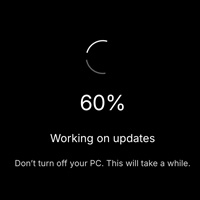
Цей інструмент імітує знайомий екран «Робота над оновленнями», який з’являється у Windows 11. Натисніть «Повноекранний режим», і симуляція заповнить дисплей анімованим індикатором та відсотками, що зростають самі по собі — жодних файлів чи реальних змін у системі.
Як запустити розіграш
- Встановіть Час оновлення — скільки хвилин має тривати «оновлення» до досягнення 100%.
- Встановіть Початковий %, якщо хочете почати відлік не з нуля.
- Натисніть Старт, перейдіть у повноекранний режим і залиште пристрій.
- Натисніть Esc або закрийте вкладку в будь-який момент, щоб завершити «оновлення».
Хто використовує фейковий екран оновлення Windows?
Класичні офісні розіграші
Запустіть це на моніторі колеги під час обіду. Коли він повернеться, то побачить довге позапланове оновлення Windows. Це нешкідливо і легко вимкнути.
Створення контенту
Стрімери та автори відео використовують фейкове оновлення для інтро, мемів або жартів на кшталт «ПК вимкнувся посеред стріму». На камері цей екран не відрізнити від справжнього.
IT-навчання та демо
Викладачі можуть показати, як виглядає процес оновлення, не запускаючи його насправді. Це зручно для навчання користувачів, коли не можна відключати робочу станцію від мережі.
Кіно та театр
Потрібно, щоб ноутбук у кадрі виглядав так, ніби він оновлюється? Завантажте цю сторінку замість встановлення реальних патчів — пристрій залишиться готовим до наступного дубля.