
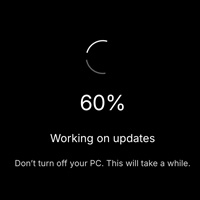



What is the Windows 11 Fake Update?
This tool mimics the familiar “Working on updates” screen that ships with Windows 11. Click Fullscreen and the simulation takes over the display with a spinning indicator and a percentage that ticks up on its own — no files, no popups, nothing actually updating.
How to run the prank
- Set the Update time — how many minutes the “update” should last before it reaches 100%.
- Set the Start % if you want to pick up the count mid-update.
- Press Start, go fullscreen, and leave the device alone.
- Hit Esc or close the tab at any time to end the “update.”
Who uses a fake Windows update screen?
Classic desk pranks
Plug it in on a coworker’s monitor during lunch and watch them return to what looks like a long, unscheduled Windows update. Harmless and easy to reverse.
Content creation
Streamers and short-form creators use the fake update for intros, meme clips, and fake "my PC died mid stream" bits. The screen is indistinguishable from a real update on camera.
IT training & demos
Trainers can walk through what an update looks like without committing the actual machine to one. Useful when you’re teaching end-user expectations and cannot pull a real workstation offline.
Film & stage
Need a laptop on set to look like it’s updating? Load this page instead of installing a real patch — the device stays ready for the next take.